managed.zip を右クリックして「プロパティ」を開きます。managedsample.htm を開いてください。
【このテンプレートの目的】
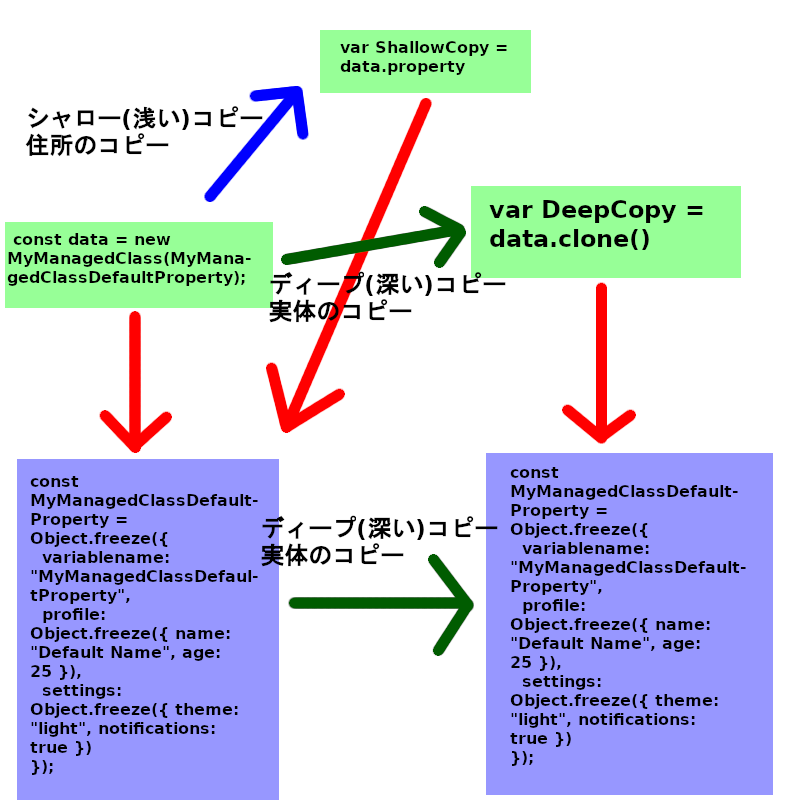
このプログラムは、JavaScriptで複雑なデータを扱う際に発生しやすい「意図しないデータの書き換え」を防ぐためのものです。
clone()(複製)や merge()(統合)といった命令を使うことで、元のデータを安全に保ったまま、新しい状態を作ることができます。
//2015

//add class 2021

//add ManagedClass 2025


/**
 * MyManagedClassの結果はオブジェクトとして返されるが、配列型が必要な場合はtoArrayIfIndexedを使用。
 * 例: const items = toArrayIfIndexed(instance.property.profile.items, true);
 */
/**
 * MyManagedClassは配列をオブジェクトとして処理します。
 * 配列型が必要な場合、toArrayIfIndexedを使用して変換してください。
 * 例:
 * const instance = new MyManagedClass({ items: [{ id: 1 }, { id: 2 }] });
 * const itemsArray = toArrayIfIndexed(instance.property.items, true); // [{ id: 1 }, { id: 2 }]
// 配列プロパティの取得
const instance = new MyManagedClass({ profile: { items: [{ id: 1 }, { id: 2 }] } });
const items = toArrayIfIndexed(instance.property.profile.items, true);
items.forEach(item => console.log(item.id)); // 1, 2

// トップレベルが配列
const arrayInstance = new MyManagedClass([{ id: 1 }, { id: 2 }]);
const array = toArrayIfIndexed(arrayInstance.property, true);
console.log(array); // [{ id: 1 }, { id: 2 }] */
/**
 * 数字文字列のキーを持つオブジェクトを配列に整形する
 * @param {Object} obj - 変換対象のオブジェクト
 * @param {boolean} [force=false] - キーが数字文字列でない場合も強制的に配列に変換
 * @param {String} [sparseHandling = 'keep'] - 空白配列のコンパクト化の選択
 * @returns {Array|Object} 配列(変換可能な場合)または元のオブジェクト
 */
function toArrayIfIndexed(obj, force = false, sparseHandling = 'keep') {
  if (!obj || typeof obj !== 'object' || Array.isArray(obj)) return obj;
  const keys = Object.keys(obj);
  const isIndexed = keys.every((key, i) => String(i) === key);
  if (!isIndexed && !force && process.env.NODE_ENV !== 'production') {
    console.warn('Non-sequential keys detected; consider using force=true or sparseHandling="compact"');
  }
  const maxIndex = keys.length > 0 ? Math.max(...keys.map(Number)) + 1 : 0;
  const result = new Array(maxIndex);
  for (const key of keys) {
    result[Number(key)] = obj[key];
  }
  if (sparseHandling === 'compact') {
    return result.filter(x => x !== undefined);
  }
  return result;
}

// フォールバック用の簡易クローン関数
function fallbackClone(item, seen = new WeakSet()) {
  if (item === null || typeof item !== 'object') return item;
  if (seen.has(item)) {
    throw new Error('Circular reference detected in fallbackClone');
  }
  seen.add(item);
  if (typeof item.clone === 'function') {
    return item.clone();
  }
  if (Array.isArray(item)) return item.map(item => fallbackClone(item, seen));
  if (item instanceof Date) return new Date(item);
  if (item instanceof Map) return new Map(fallbackClone([...item], seen));
  if (item instanceof Set) return new Set(fallbackClone([...item], seen));
  if (item instanceof RegExp) return new RegExp(item);
  const cloned = {};
  for (const key in item) {
    cloned[key] = fallbackClone(item[key], seen);
  }
  return cloned;
}

// 安全なstructuredCloneラッパー
function safeStructuredClone(item) {
  try {
    return structuredClone(item);
  } catch (e) {
    return fallbackClone(item);
  }
}

function recursiveClone(item, seen = new WeakSet()) {
// --- 軽量化ポイント①: プリミティブ型は即座に返す ---
  // null, undefined, 数値, 文字列, booleanなどはコピー不要
  if (item === null || typeof item !== 'object') {
    return item;
  }

  // 循環参照のチェック
  if (seen.has(item)) {
    throw new Error('Circular reference detected');
  }
  seen.add(item);

  // 1. clone() メソッドを持つ場合
  if (typeof item.clone === 'function') {
    return item.clone();
  }

  // 2. 配列の場合
  if (Array.isArray(item)) {
    // mapは配列に対して非常に最適化されています
    return item.map(element => recursiveClone(element, seen));
  }

  // 3. プレーンなオブジェクトの場合
  if (item.constructor === Object) {
    const clonedObject = {};
    // --- 軽量化ポイント②: Object.keys() を使用 ---
    const keys = Object.keys(item);
    for (let i = 0; i < keys.length; i++) {
      const key = keys[i];
      clonedObject[key] = recursiveClone(item[key], seen);
    }
    return clonedObject;
  }

  // 4. その他(Date, RegExp等、どうしてもクローンが必要な特殊な型のみ)
  // ここまで来るのは稀なので、安全策として残す
  return safeStructuredClone(item);


/*old version
  // 循環参照のチェック
  if (item && typeof item === 'object' && seen.has(item)) {
    throw new Error('Circular reference detected');
  }
  if (item && typeof item === 'object') {
    seen.add(item);
  }

  // 1. clone() メソッドを持つ場合
  if (item && typeof item.clone === 'function') {
    return item.clone();
  }

  // 2. 配列の場合
  if (Array.isArray(item)) {
    return item.map(element => recursiveClone(element, seen));
  }

  // 3. プレーンなオブジェクトの場合
  if (item && typeof item === 'object' && item.constructor === Object) {
    const clonedObject = {};
    for (const key in item) {
      clonedObject[key] = recursiveClone(item[key], seen);
    }
    return clonedObject;
  }

  // 4. その他(プリミティブ値など)
  return safeStructuredClone(item);

*/
}


function simpleDeepMerge(target, source, seen = new WeakSet(), deep = true) {
    if (!deep) {
        return Object.assign({}, target, source);
    }
    // ターゲットが有効なオブジェクトであることを確認
    // ターゲットがオブジェクトでなければ、ソースをディープコピーして返す(上書き)
    if (target === null || typeof target !== 'object') {
        // ターゲットが無効な場合、処理を継続する意味がないので、ソースをそのまま返すか、safeStructuredCloneを使う
        return safeStructuredClone(source);
    }

    // ソースが有効なオブジェクトであることを確認
    if (source === null || typeof source !== 'object') {
        return target; // マージするものがないため、ターゲットをそのまま返す
    }

    // 1. 循環参照チェックと登録
    // この層での処理が確定したら登録
    if (seen.has(target) || seen.has(source)) {
        throw new Error('Circular reference detected');
    }
    seen.add(target);
    seen.add(source);

    // 配列をオブジェクトに変換するヘルパー関数
    const arrayToObject = arr => ({ ...arr });


    if (Array.isArray(target) && process.env.NODE_ENV !== 'production') {
      console.warn('Target array converted to object in simpleDeepMerge. Use toArrayIfIndexed to convert back.');
    }


    // 配列処理の統一: 配列はすべてインデックス付きのプレーンなオブジェクトとして扱う
    if (Array.isArray(target)) {
        // targetはマージのターゲットであり、型を維持するため、新しいオブジェクトに変換
        // 既存の target の内容を維持しつつ、オブジェクトとしてマージするために、新しいオブジェクトを作る
        target = Object.assign({}, target);
    }
    if (Array.isArray(source)) {
        source = arrayToObject(source);
    }

    // 2. マージロジック
    for (const key in source) {
        const sourceValue = source[key];
        const targetValue = target[key];

        // ターゲットの値がオブジェクトで、ソースの値もオブジェクトの場合にのみ再帰する
        if (sourceValue && typeof sourceValue === 'object' && sourceValue.constructor === Object) {

            // ターゲットの値がオブジェクトでなければ、新しい空のオブジェクトで初期化
            if (!targetValue || typeof targetValue !== 'object' || Array.isArray(targetValue)) {
                 target[key] = {};
            }
            // 配列をオブジェクトとして扱うため、ここでは Array.isArray(targetValue) のチェックは削除しても良いが、
            // ターゲットが配列として存在していた場合は既に Object.assign({}, target) でオブジェクトになっているはず

            simpleDeepMerge(target[key], sourceValue, seen); // 再帰

        } else if (typeof sourceValue?.clone === 'function') {
            // カスタムクラスは clone() で上書き
            target[key] = sourceValue.clone();

        } else {
            // プリミティブ、その他のオブジェクトは safeStructuredClone でディープコピーして上書き
            target[key] = safeStructuredClone(sourceValue);
        }
    }

    return target;
}

const MyManagedClassDefaultProperty = Object.freeze({
  variablename: "MyManagedClassDefaultProperty",
  profile: Object.freeze({ name: "Default Name", age: 25 }),
  settings: Object.freeze({ theme: "light", notifications: true })
});
/*//参考//設計のヒント
const MyManagedClassDefaultProperty = Object.freeze({
  variablename: "DefaultInstance",
  // ここを自分のプロジェクトで使いたい階層名(status, position, items等)に書き換えます
  property01: Object.freeze({propety11: 1, propety21: 2, ...}),
  property02: Object.freeze({propety12: 3, propety22: 4, ...}),...
  //必要に応じて property03, property04... と任意の名前で増やしてもOKです
});
*/

class MyManagedClass {
  constructor(p, deep = true) {
    if(deep) {
      const target = recursiveClone(MyManagedClassDefaultProperty);
      this.property = simpleDeepMerge(target, p);
    }
    else {
      this.property = Object.assign({}, MyManagedClassDefaultProperty, p);
    }
  }
  clone() {
    return new MyManagedClass(this.property);
  }
  merge(p, deep = true) {
    // 1. コピー先のベースとなるプロパティを決定する
    let baseProperty;
    if (deep) {
      // ディープコピーしてからマージするために、まず自身のpropertyをディープコピーする
      baseProperty = recursiveClone(this.property);

      // 2. 新しいプロパティオブジェクト (baseProperty) に新しいデータ (p) をディープマージする
      //    (simpleDeepMergeがターゲットをインプレイスで更新すると仮定)
      simpleDeepMerge(baseProperty, p);
    } else {
      // シャローマージ: Object.assignでthis.propertyのシャローコピーにpのプロパティを上書き
      baseProperty = Object.assign({}, this.property, p);
    }
    // 3. 不変性を維持するため、新しいプロパティを持つ新しいインスタンスを返す
    return new MyManagedClass(baseProperty, deep);
  }
  isThisType(rh){
    return rh instanceof MyManagedClass;
  }


  toString(){
    try {
      const replacer = (key, value) => {
        // 自作クラス(N6LVectorなど)を見つけた場合
        if (value && typeof value === 'object'&&value.constructor.name !== 'Object'&&value.constructor.name !== 'Array') {

          // N6LVector のように Str() メソッドを持っている場合はそれを使う
          // toString() を持っているなら実行する
          const stringRepresentation = typeof value.Str === 'function' ? value.Str() :
            (typeof value.toString === 'function' ? value.toString() : "[Unknown]");

          // 「中身」と「Str/toStringの結果」を両方持つ新しいオブジェクトを返す
          return {
            _toString: stringRepresentation, // toString の結果をここに格納
            ...value                        // 本来の中身を展開して表示
          };
        }
        return value;
      };
/*
      const replacer = (key, value) => {
        if (value && typeof value.toString === 'function' && value.constructor.name !== 'Object' && value.constructor.name !== 'Array') {
          // ここで return value.toString() をしてしまうと中身が消えるので
          // 中身も見せたいなら、型情報を混ぜた新しいオブジェクトを返す
          return {
            __class: value.constructor.name,
            ...value // 中身を展開して含める
          };

          return value.toString(); // 自作クラスのtoStringを優先
        }
        return value;
      };
      // スペース数に「2」を指定することで、JSONは2スペースでインデントされます。
      const jsonString = JSON.stringify(this.property, replacer, 2);      // JSON.stringify(データ, リプレイサー, スペース数)
      //const jsonString = JSON.stringify(this.property, null, 2);      // JSON.stringify(データ, リプレイサー, スペース数)
*/
      // スペース数に「2」を指定することで、JSONは2スペースでインデントされます。
      const jsonString = JSON.stringify(this.property, replacer, 2);      // JSON.stringify(データ, リプレイサー, スペース数)

      // JSON文字列の各行の先頭に、カスタムヘッダーに合わせたインデント(ここでは2スペース)を追加
      // 最初の中括弧{は除く
      const indentedJson = jsonString.split('\n')
                                     .map((line, index) => (index > 0 ? '  ' : '') + line)
                                     .join('\n');

      // ヘッダーと整形されたJSONを結合
      if(this.property.variablename) return `MyManagedClass Instance (${this.property.variablename}) {\n  "property": ${indentedJson}\n}`;
      else return `MyManagedClass Instance {\n  "property": ${indentedJson}\n}`;
    } catch (e) {
      // 循環参照などが含まれる場合の処理
      return `MyManagedClass Instance [Serialization Error: ${e.message}]`;
    }
  }

  //ここにそのほかのメソッドを記述

}

//使用例

function managedtest01(){

  // 使用例: 複数の型とネスト構造を持つ配列
  const nestedHoge = [
    new Person2(taroData),
    ['a', ['b', new Person2(jiroData)]],
    { x: 1, y: 2 }
  ];

  const clonedHage = recursiveClone(nestedHoge);
  nestedHoge[1][0] = 'changed';

  console.log(nestedHoge);
/*
  const nestedHoge = [
    new Person2(taroData),
    ['changed', ['b', new Person2(jiroData)]],
    { x: 1, y: 2 }
  ];
*/
  console.log(clonedHage);
/*
  const clonedHage = [
    new Person2(taroData),
    ['a', ['b', new Person2(jiroData)]],
    { x: 1, y: 2 }
  ];
*/

  const personMap = {
    leader: new Person2(taroData),
    member: {
      subleader: new Person2(jiroData),
      bench: new Person2(zakoData)
    }
  };

  const clonedPM = recursiveClone(personMap);
  const tmpP = personMap.leader.clone();
  personMap.leader = personMap.member.bench.clone();
  personMap.member.bench = tmpP.clone();

  console.log(personMap);
/*
  const personMap = {
    leader: new Person2(zakoData),
    member: {
      subleader: new Person2(jiroData),
      bench: new Person2(taroData)
    }
  };
*/
  console.log(clonedPM);
/*
  const clonedPM = {
    leader: new Person2(taroData),
    member: {
      subleader: new Person2(jiroData),
      bench: new Person2(zakoData)
    }
  };
*/

  managedtest02();
}

function managedtest02(){

  const data = new MyManagedClass(taroData);

  const elm = document.getElementById('TDATA');
  elm.value = data.toString();
  console.log(data.toString());
/*
MyManagedClass Instance (taroData) {
  "property": {
    "variablename": "taroData",
    "profile": {
      "name": "Taro",
      "age": 25,
      "nation": "Japan",
      "items": {
        "0": "ball",
        "1": "glove"
      }
    },
    "settings": {
      "theme": "red",
      "notifications": true
    }
  }
}
*/

  const MyManagedClassMap = {
    leader: new MyManagedClass(taroData),
    member: {
      subleader: new MyManagedClass(jiroData),
      bench: new MyManagedClass(zakoData)
    }
  };

  const clonedMM = recursiveClone(MyManagedClassMap);
  const tmpM = MyManagedClassMap.leader.clone();
  MyManagedClassMap.leader = MyManagedClassMap.member.bench.clone();
  MyManagedClassMap.member.bench = tmpM.clone();

/*

  MyManagedClassMap.leader.property.permissions = ["edit", "view"];
  MyManagedClassMap.member.subleader.property.permissions = MyManagedClassMap.leader.property.permissions;
  MyManagedClassMap.leader.property.permissions[0] = "save";
  var str = MyManagedClassMap.leader.property.permissions;
  str += MyManagedClassMap.member.subleader.property.permissions;

// 1. シャローマージの結果を新しい変数に格納
// profile全体を渡すのではなく、ネストされていないプロパティだけを渡すのが安全
const newLeader = MyManagedClassMap.leader.merge({
    // マージデータにネストされていないプロパティのみを渡す
    variablename: 'New Leader Data'
}, false);

// 2. 元の leader インスタンスのネストされたデータを変更
// profile.name はマージされていないため、参照共有が継続しているはず
MyManagedClassMap.leader.property.profile.name = 'Old Name Changed';

// 3. 結果の確認
//var str = MyManagedClassMap.leader.property.permissions; // (前の処理の結果)
//str += MyManagedClassMap.member.subleader.property.permissions; // (前の処理の結果)

str += "\n" + newLeader.property.profile.name + "\n";
elm.value = elm.value + "\n" +str;

*/

  console.log(MyManagedClassMap);
/*
  const MyManagedClassMap = {
    leader: new MyManagedClass(zakoData),
    member: {
      subleader: new MyManagedClass(jiroData),
      bench: new MyManagedClass(taroData)
    }
  };
*/
  console.log(clonedMM);
/*
  const clonedPM = {
    leader: new MyManagedClass(taroData),
    member: {
      subleader: new MyManagedClass(jiroData),
      bench: new MyManagedClass(zakoData)
    }
  };
*/

}

...以下省略...